See App Store and Google Play downloads in one dashboard
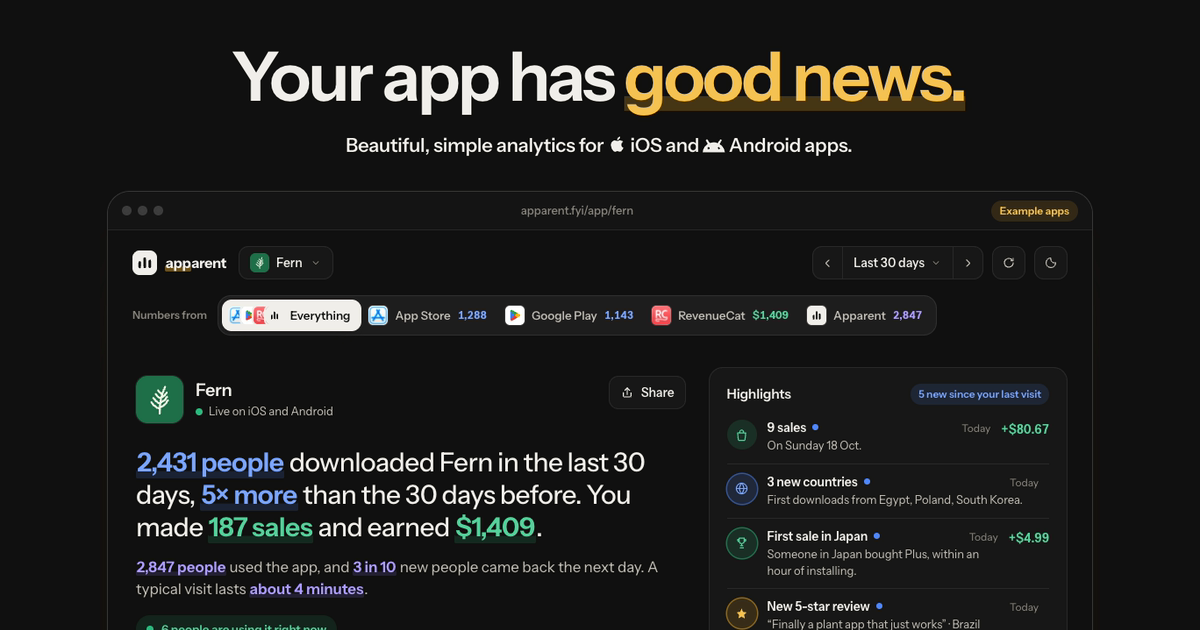
Short answer: Neither store shows the other, so you need a tool that reads both: Apparent (both stores plus RevenueCat and what people do in the app, in plain words), Appfigures (free for up to 5 apps, with ASO), or a spreadsheet you fill from each store's reports.
App Store Connect shows iPhone. Google Play Console shows Android. To see one number for the whole app, something has to read both reports every day. Here's how to do it with Apparent in about 15 minutes, no code, and what else works.
Last updated
14 days free. No card, no password.
Steps
- Add your app. Paste its App Store or Google Play link at apparent.fyi. The name and icon come with it.
- Connect App Store Connect. In Users and Access › Integrations › App Store Connect API, make a key with the Finance role and download the .p8 file (Apple shows it once). Paste it with the Issuer ID and your vendor number from Payments and Financial Reports.
- Connect Google Play. In Google Cloud, make a service account with a JSON key. In Play Console › Users and permissions, invite its email with View app information and View financial data. Then copy the Cloud Storage address under Download reports › Statistics. Google can take a day to open it.
- Read both stores as one. Each app's page shows one number for iPhone and Android together, split by store underneath, and either store on its own a tap away. All your apps sit on one page.
What you see
- Downloads from both stores, by day and by country, with updates and redownloads left out.
- Sales from both stores in US dollars, as what you keep after the store's cut.
- Ratings and reviews from both stores in one list, with a push for each new 5-star or 1–2-star review.
- With RevenueCat connected: trials, subscriptions and refunds, and who bought.
- With Apparent's SDK in the app: who's using it right now and what they do, next to the downloads.
Other ways
- Appfigures: reads both stores for all your apps, with ASO and competitor estimates. Free plan for up to 5 apps.
- AppFollow: reads downloads and sales reports from both consoles, made mainly for reviews and ASO.
- A spreadsheet: download each store's reports by hand, or pull them every day with a small script. Free, and the most work.
Why the two stores never match exactly
- They count differently: Apple reports downloads per product and country, Google Play reports installs per device.
- They arrive at different times: the App Store's day usually comes a day or two later, Google Play's can take up to 5 days. Today is never in either yet.
- A day isn't the same day: each store closes its day at its own time, so comparing weeks is fairer than comparing single days.
Facts about other tools checked on 2 November 2026 against Appfigures pricing, AppFollow integrations. Something out of date? Tell us at hello@apparent.fyi and we'll fix it.
Questions
Can I see App Store Connect and Google Play Console in one dashboard?
Yes. Apparent, Appfigures and AppFollow read both stores. Apparent shows one number for both, split by store, next to RevenueCat sales and what people do in the app.
Is there a free way?
Appfigures' free plan covers up to 5 apps, or download both stores' reports into a spreadsheet. Apparent is free for 14 days, then from $10 a month.
Do I need to add code?
No. Store numbers come from the stores' own reports with read-only access. Code is only needed for what people do inside the app.
Why are today's downloads empty?
Neither store has reported today yet. The App Store's day usually arrives a day or two later, Google Play's up to 5 days later.
My app is only on one store. Does it still work?
Yes. Connect the one store you're on; the page shows that store only.
Also read
- App analytics for solo developers
- Analytics for apps you built with AI
- Add analytics to your app with an AI coding agent
- The best analytics tool for apps built with Cursor
- How to export Apple Ads data to Sheets, Looker Studio or Tableau
- How to connect App Store Connect to Google Sheets
- An MCP server for your app's analytics
- The best analytics for your first app
- Best app analytics tools for indie developers (2026)
- Get an alert when your app's downloads or sales drop
- What Apparent does
- Expo analytics, without a native build
- Ionic analytics, without Firebase
- App analytics without the ATT prompt
- Privacy-first analytics for mobile apps
- In-app chat for your mobile app
- In-app support chat for React Native and Expo
- An Intercom alternative for mobile apps
- SDKs for iOS, Android, React Native, Flutter and Capacitor
- Apparent compared with Mixpanel, PostHog, Amplitude and Firebase
Your app already has a story. Start reading it.
14 days free. No card, no password.